
File Raptor is a utility to remove various irritating files and directories that certain Windows programs produce on your hard-disk. It does this simply by scanning all the paths listed in the text file 'prey.txt' and recursively deleting any files or folders that match one of the paths. Warning: I have had to reinstall Windows because of accidentally having 'c:\windows\*.*' in the text file, so use this software with caution. To see what my prey file currently contains, click here. Other features include:-
- A path such as 'c:\dir\*.*' will delete the contents of a directory, but not the directory itself. 'c:\dir' will delete the directory too.
- A version 'raptor_background.exe' is included so that you can run this program continuously in the background. Put a shortcut to it in your start menu's 'StartUp' folder and it will run automatically whenever Windows starts.
- Both versions have a CPU load-management system whereby they check for files less frequently as the time since the last file deleted increases.
- You are allowed to use one '*' wildcard for a path. For example, 'c:\windows\*\*.tmp' would delete all .tmp files at any level inside the Windows directory.
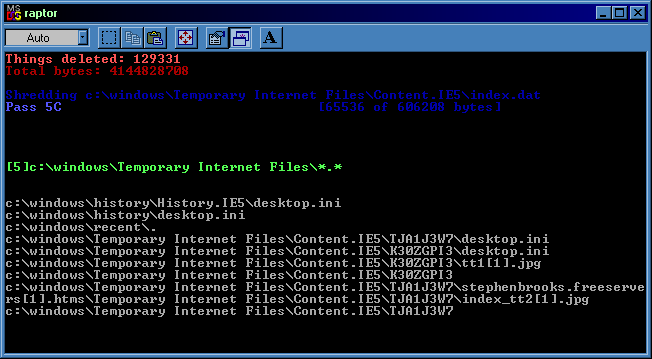
- Files can be shredded before deletion to various degrees, settings for this are in 'config.txt'. The shredding can also successfully erase the notorious index.dat files if you tell Raptor to delete the correct directory; although the files can't be removed from view due to some weird Windows security feature, Raptor fills them with meaningless bytes.
- You can also call Raptor from the commandline by writing something such as:
raptor c:\somefile.txt c:\otherfile.txt
...which will shred those files at the default level specified in config.txt, or you can use other syntax from the prey file, such as:raptor [5]c:\windows\cookies\*.*
...which will shred the contents of the cookie directory at maximum settings. - Just for interest, the program keeps a running total of the number of objects and bytes of data deleted. This is useful for checking that it is deleting the correct thing: when you are accidentally deleting your whole Windows directory, the bytes counter should reach 170000000 fairly rapidly, at which time you should shut off the program and reinstall Windows.
- The total is retained between sessions: to reset it, simply delete the file 'totals.dat' in the Raptor directory while the program is not running.
- Currently you have to quit the background program using Task Manager, and the foreground (DOS) program using its window's close button.
Update (2005-Apr-07). FYI: this article implies you should add some folder to do with Macromedia Flash Player to your prey.txt file if you want to be rid of tracking cookies. My best guess is that the directory in question is "C:\WINDOWS\Application Data\Macromedia\Flash Player". I will edit back here if doing this messes up my browser...
Update (2004-Nov-21). Raptor can now be called from the commandline with arguments that are lines in the same format as in prey.txt. In this mode, Raptor quits after it has shredded the requested files.
Update (2004-Aug-25). Added the path wildcard feature and also changed the way it handles deleting entire directories. Before this point, 'dir\*.*' would delete the outer directory as well as the files inside, 'dir' would do the same, and 'dir\' wouldn't work at all!
Update (2003-May-03). Shredding functionality added. In fact I programmed the basics of the shredding code back in 2001, but didn't complete the project because the non-deletability of index.dat files confused Raptor's algorithm. Fortunately I found a workaround.
See also: for a more comprehensive free Windows "junk remover", take a look at Crap Cleaner. They've recently added shredding functionality too.
- - - [Download] - - -
File Raptor (.7z file, 26KB; zip file, 49KB).
Use 7-Zip to open .7z files, WinZip files (less compression) provided for compatibility.
- - - [Screenshot] - - -
![[zip]](/hidden/file_zip.png) raptor.zip
raptor.zip![[html]](/hidden/file_html.png) raptor_prey.html
raptor_prey.html


